91.7 Radio Live Director
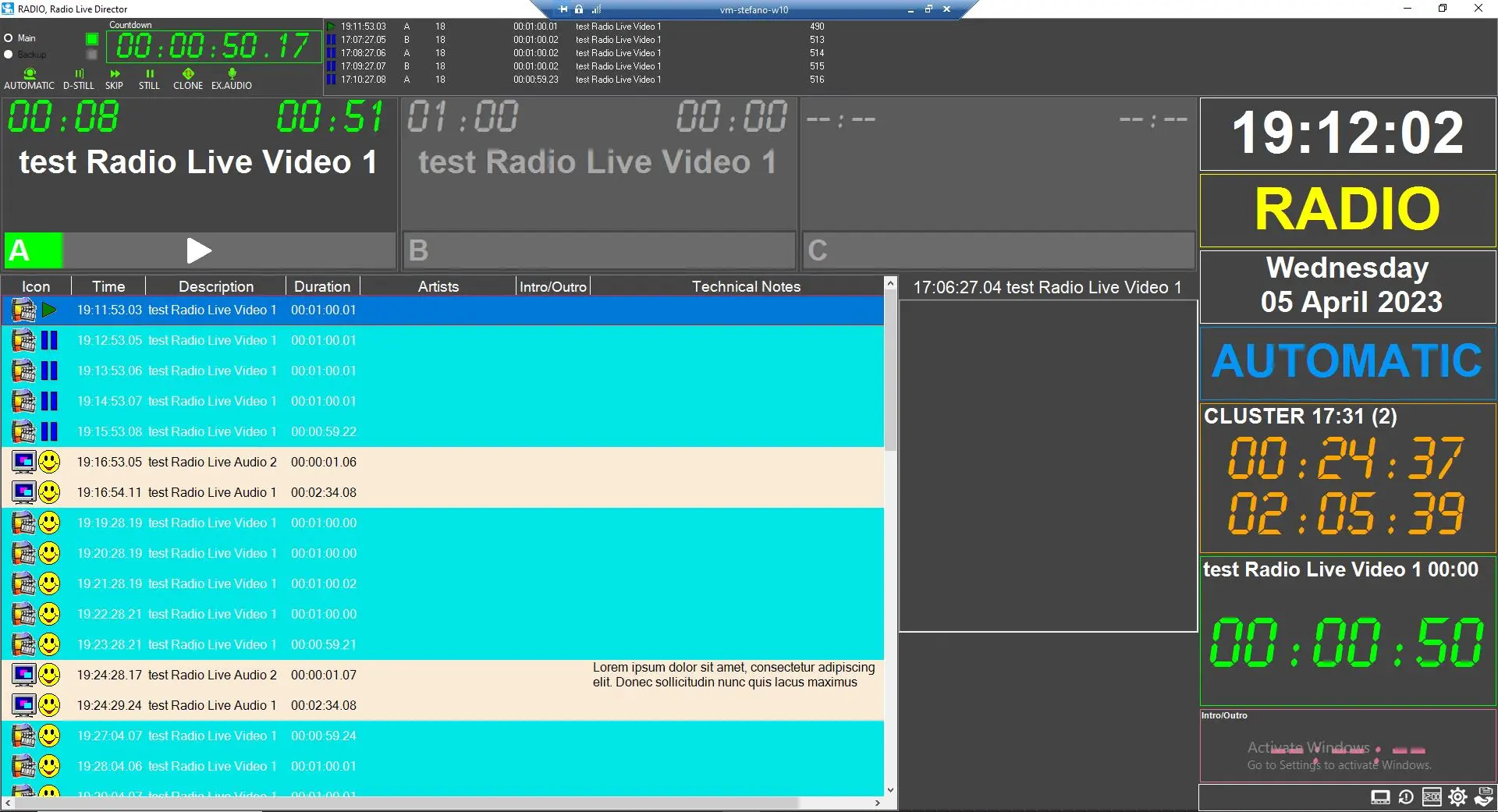
Radio Live Director is designed as a simplified interface of Radio Live playout with a focus on previews and schedules but missing camera controls and overlay graphics.
The main interface is composed of:
REMOTE CONTROL PANEL
This section is composed, on the right, of a list of the playing and cued events of the schedule and, on the left, the following options to control the on-air status of main and backup:
- main/backup: this option lets the user visualise the status of the main or backup playout
- countdown: counter to the next event
- Automatic / Live Assist: This option controls the automatic skip of manual events: if set to Automatic, it will treat every manual event as a timecode (so ending it normally without using skip functions); if instead it is set to Live Assist, every manual event will be put in D-Still, and it will be necessary the manual skip from an operator to proceed to the next event.
- D-Still: Delayed still. Pauses the playout when the currently playing event is finished.
- Skip Skips to the next event.
- Still: Pauses the playout playback until a key (i.e. still, skip or restart) is pressed.
- Clone: switches to clone playout
- Ex. Audio: mutes the current on air to switch to an external audio source (i.e. speaker microphone)
PLAYER A AND B INTERFACES
Each panel resumes the onair counter of the current event on the left and the countdown to the next event on the right.
Every panel has its audio mapping configuration and the air of the event is alternated between A and B every time event switches to the next one.
PLAYER C INTERFACE
This interface has the same visualisation as the A and B interface, but it visualises the counter(s) of the preview play (for more information, please refer to chapter 91.7.2.0 Radio Live Director - Schedule).
SCHEDULE
Daily schedule can be populated by context menu > new, by the app Scheduling > Executive Editor or by the app Radio Live Playout > schedule.
Please refer to chapter 91.7.2.0 Radio Live Director - Schedule for a detailed explanation.
COUNTERS
A section dedicated to local time counters and events counters. Check help chapter 91.7.1.0 Radio Live Director Parameters for a detailed explanation.
SETTINGS MENU
The settings menu in the bottom right corner of Radio Live Director is composed of:
- Waveform: turn waveform visualization on/off
- Player C: turn player C on/off
- Reset Player C: unload every clip or group of clips loaded in Player C
- Remote control panel: turn remote control panel on/off
- Parameters: opens the Radio Live Director parameters menu (please refer to 91.7.1.0 Radio Live Director Parameters for details)
- Save logs: opens save logs window
 Radio_Live_Director