84.4.4.23 STANDARD > IBMS > SKY TXT-CSV
Export Scope
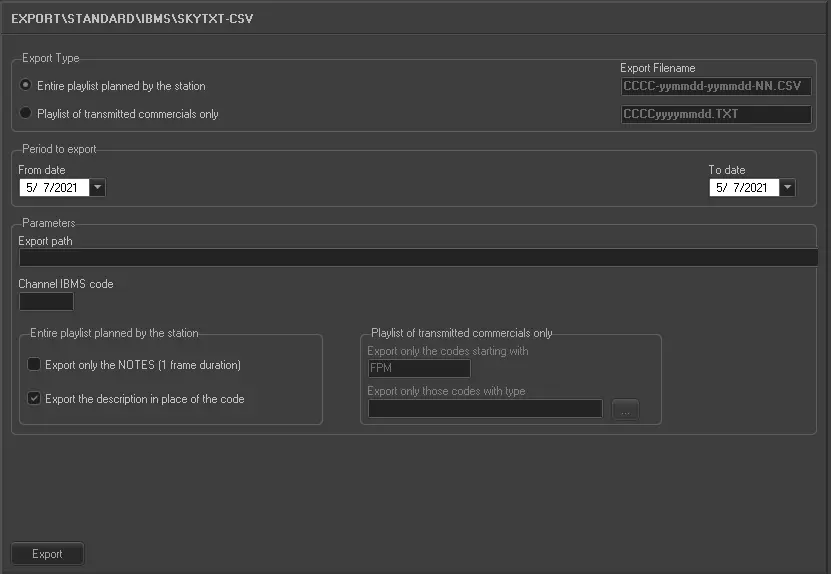
The IBMS SKY TXT CSV export allows generating two different kinds of files, the entire scheduling of a certain period or only the commercial within a given dates frame.
Export parameters
This export allows the following parameters to be set:
Export type: Specify the type of export to be performed, available types include:
Entire playlist planned by the station - Exports a single file containing all the events expected in the playlist which and which are longer than 1 minute. The file format is .csv (lowercase), each line represents an event and contains 19 fields separated by a comma (,).
The structure of the file name is CCCC-aammgg-aammgg-nn.csv, where CCCC is the IBMS code of the channel, the first aammgg is the initial date, the second aammgg is the final date and nn is a progressive number in case of multiple exports for the same period.
A useful tool if you have lots of short events scheduled is the "Export only the notes" parameter which allows you to export only the NOTES found in playlists (events with a 1 frame duration).
Playlist of transmitted commercials only -
Export only the Sky commercials transmitted by the station, representing as such an As Run of the broadcast. Commercials exported are only those originally imported by the IBMS SKY CSV function and that contains the "IMPORTGENERIC" string in their source field. The file format is .TXT, each line represents an event and contains 9 fields separated by Tabs.
The structure of the filename is CCCCaaaammgg.txt, where CCCC is the IBMS code of the channel and aammgg is the date of the exported playlist.
It's possible to export whether only those assets that begin in a certain way or of a particular typology.
Period to export: Specify the period (from date to date) to be exported.
Parameters
•Export path: Indicate the path on which the exported file will be placed.
•Channel IBMS Code: Insert the code assigned by PubliKompass to the station. Code's maximum length is four characters.
Entire playlist planned by the station In case the "Entire playlist planned by the station" export type has been chosen, it will be required to compile the following parameters:
•Export only the NOTES (1 frame duration): Allows you to export only the "notes" present in the schedules, that is, the titles of container events (1 frame duration) scheduled in playlists, also calculating the duration of a note according to the start of the next note.
•Exports the description in place of the code: If this option is enabled, the asset’s title would be exported into column 4 (previously stored the exported asset code) in the exported CSV file, column 5 (initially stored the asset title) in CSV file would be exported as blank. If there is comma (,) found in the asset title the comma would be replaced with blank space in the asset title.
Playlist of transmitted commercials only
In case the "Playlist of transmitted commercials only" export type has been chosen, it will be required to compile the following parameters:
•Export only the CODES starting with: Specify the leading string that must be present at the beginning of the code of an asset in order to export it.
•Export only those codes with type: Narrow the export only to those assets belonging to a specific set of types.
Launch the export
Once all parameters have been correctly set, just press the <Export> button to launch the export operation.
 5088_Export_standard_ibms_sky_txt_csv