54.5.2.3 Copies
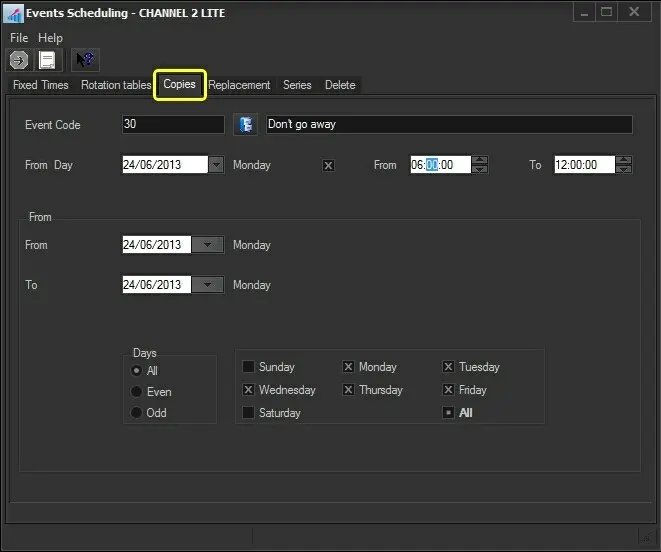
The Copies section allows you to copy a specific asset scheduled on a certain date in a set period to another date. To start copying an event, search for it using the [Event Code] button and then compile the following parameters:
Copies_1
Event Code: Search for the scheduled asset to be copied.
From day: Select the day and, optionally, the exact time from which the scheduled asset will be copied.
From - to (time): Optionally, specify the exact period from which the scheduled asset will be copied.
From - To (dates): Specify the date range in which the scheduled asset will be copied. By default, the validity period of the asset will be proposed.
Days: Select the days for which the event to be scheduled is valid, in which it will be scheduled:
All - On every day of the week, in the period of the dates indicated
Even - Only on even days (e.g. 2-4-6-8...30) in the chosen period, independently of the day of the week
Odd - Only on odd days (e.g. -3-5-7-9...31) in the chosen period
Specific days - Select the weekdays (e.g. Monday and Friday) on which you want the commercial asset to be scheduled
Once all parameters have been correctly set, press the RUN button to copy.
Note: The operation can be repeated more than once. For example, if times are added but not changed in the original schedule, it is possible to repeat the copy as the existing data will be replaced with new data.
 Copies_1