21 Personal Data
Etere Personal Data is a centralized module designed to manage and organize all contact information within the company. It enables the registration and maintenance of data related to all entities involved in system workflows (e.g. production, sales, invoicing) through structured contact records classified as users, persons, companies, and organizations.
Information stored in this module is shared across the entire Etere ecosystem, including modules such as Scheduling, Air Sales, and BMS. By consolidating critical data (e.g. contact details, account information, tax data) into a single, accessible repository, the system ensures consistency and availability of information for all relevant departments (e.g. commercial planning, accounting). This centralized approach improves data integrity, reduces redundancy, and supports more efficient and coordinated operational workflows.
Which contact types are supported?
Etere supports four distinct contact types manageable through its web interface, categorized according to their specific roles and functions, as outlined below
AD Users: System operator accounts automatically generated through the import and synchronization of the Active Directory structure. Each user represents an individual interacting directly with the platform (e.g. scheduling operators, ingest operators, sales operators) and is uniquely identified by their authentication credentials, typically managed via external systems such as Microsoft Active Directory or SQL Server. Beyond simple identification, this enables traceability and accountability within workflows, allowing the system to log actions, permissions, and operational responsibilities across all modules and it ensures controlled access to features and data, supporting both security policies and operational transparency.
Creation: Automatic
Company: Legal entities engaged in formal commercial relationships with the organization using Etere. This category includes customers, suppliers, agencies, and any party involved in financial transactions such as sales, purchasing, or service provision. Company records are designed to store comprehensive fiscal, administrative, and financial information (e.g. tax details, billing data, payment terms), making them suitable for integration with modules like Air Sales and BMS. By centralizing all business-related data, companies support end-to-end commercial workflows, from contract management to invoicing and accounting, ensuring consistency, compliance, and efficient financial operations.
Creation: Manual
Person: Individual (natural) persons associated with the organization or with a company, typically representing specific roles such as executives, account managers, or operational contacts. Person records are used to store personal and professional contact information (e.g. name, role, email, phone) without including direct financial or fiscal data. They are often linked to companies or organizations to define relationships and responsibilities, facilitating communication and coordination across departments. This structure allows the system to maintain a clear and organized mapping between individuals and the entities they represent, improving contact management and workflow efficiency.
Creation: Manual
Organization: Non-commercial entities or external parties that interact with the system without requiring fiscal or financial data management. This category is typically used for organizations that provide or exchange content or services without being directly involved in billing processes (e.g. content providers, broadcasters, partners). Unlike companies, organizations do not require accounting details but can still be assigned access credentials (username and password) when needed, for example to enable controlled interaction with the system or contribution of media assets.
Creation: Manual
Each contact record consists of a set of basic fields (e.g. Code, Company Name, Country, City) and additional detailed fields (e.g. invoicing data, banking details, contacts, web rights), with the latter being enabled and configurable according to the contact type.
Available functions
After opening the Personal Data module from the left-hand menu, the following functions become available:
Search
New Person
New Company
New Organization
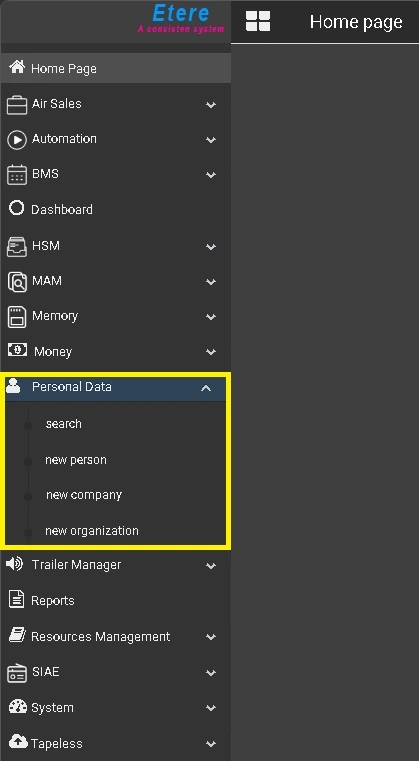 etereweb_personal_data