59.2.6.1 Musical Rotation
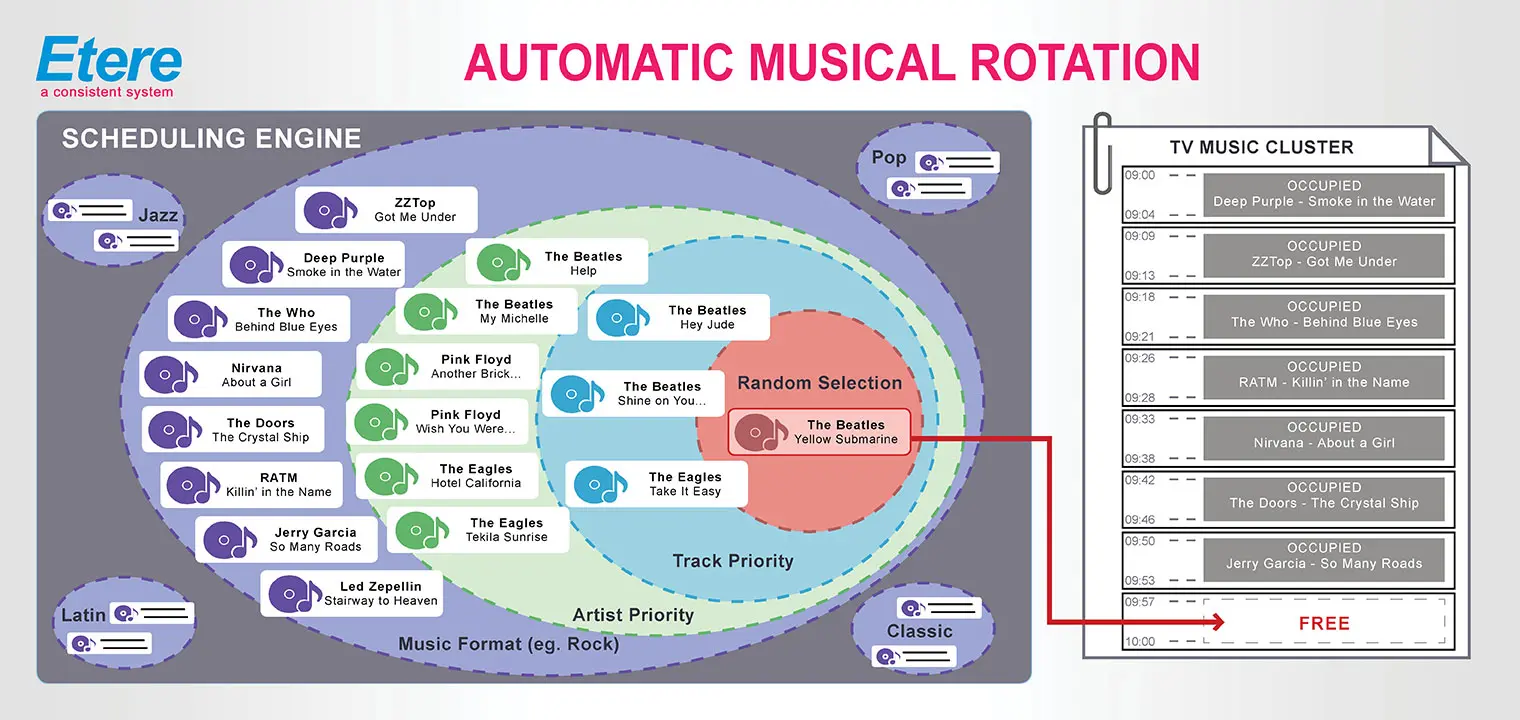
The "Musical Rotation" area allows setting the method (and parameters) to be used for selecting (among a set of tracks matching a certain music format) the track to be scheduled, as illustrated in the following figure:
Automatic_Musical_Rotation
Available parameters in this section include the following:
•Priority type
When scheduling music tracks, Etere assigns priorities to the set of assets available for scheduling (i.e. those matching a specific music format) to prevent artists/tracks repetitions.
Select under the "priority type" parameter the method used to determine (among the set of assets) which asset should be scheduled.
Priority Type: Artist, Track, Random selection
Description:
1. The scheduling engine will search for the asset with the highest artist priority, and if only one asset is retrieved, it will be immediately selected.
2. If the scheduling engine finds more than one asset featuring the same artist priority, it will check the track priority to determine the one to be selected.
3. The selection would be random if the scheduling engine finds more than one asset with the same artist and track priority.
Priority Type: Artist, Random selection
Description :
1. The scheduling engine will search for the asset with the highest artist priority; if only one asset is retrieved, it will be immediately selected.
2. The selection would be random if the scheduling engine finds more than one asset featuring the same artist priority.
Priority Type: Track, Random selection
Description :
1. The scheduling engine will search for the asset with the highest track priority; if only one asset is retrieved, it will be immediately selected.
2. The selection would be random if the scheduling engine finds more than one asset featuring the same track priority.
Priority type: Random selection
Description :1. The scheduling engine will select the asset to be scheduled randomly.
Please note that the parameters on which the calculation of priorities is based can be modified by changing the parameters below:
•No. of hours for increasing the ARTIST selection priority
The artist's priority of a musical asset depends on the distance between its last scheduled time and the requested time (the more significant the distance is, the higher the priority). The parameter set here determines the scheduling "distance" division into "time intervals" with specific priorities.
For instance, if this parameter is set to "3 hours" and the requested scheduled time is "11:00:00", the artist priority will be assigned as follows:
Last scheduled time between: 08:00:00 (day1) - 10:59:59 (day1) Artist priority: 1
Last scheduled time between: 05:00:00 (day1) - 07:59:59 (day1) Artist priority: 2
Last scheduled time between: 02:00:00 (day1) - 04:59:59 (day1) Artist priority: 3
Last scheduled time between: 23:00:00 (day2) - 01:59:59 (day1) Artist priority: 4
Last scheduled time between: 20:00:00 (day2) - 22:59:29 (day2) Artist priority: 5
NB: The "day1" is the day of the requested scheduled time, the "day2" is the previous scheduled time, the "day3" is the last planned time before "day2, etc.
•Television days are taken into account
Specify the number of past television days to be considered when calculating artists and track priorities.
NB: It is important to note that the parameters present in this section can be freely modified to meet the station's specific requirements; it can be changed until an optimal music scheduling is reached.
 Automatic_Musical_Rotation