73.3.4 Options Configuration
The "Options" tab mainly used to configure logging of error messages.
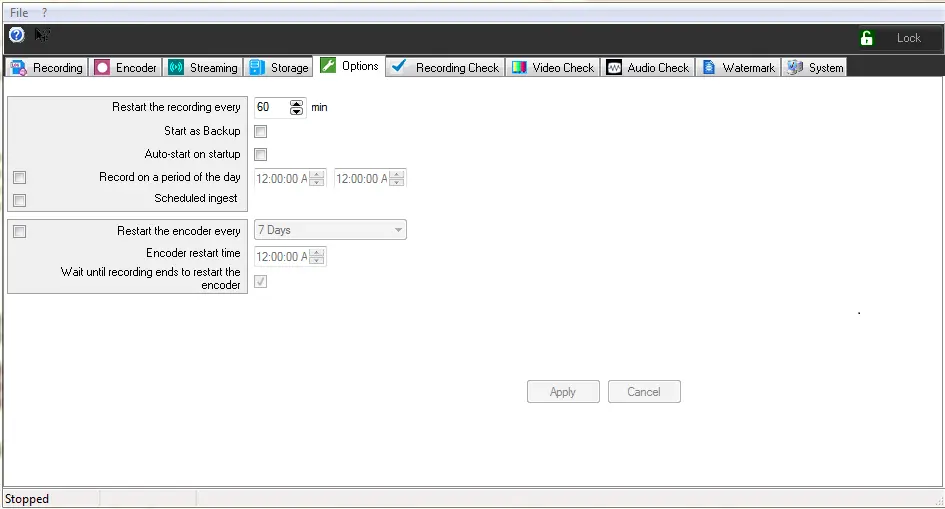
Options
Running policies
Restart the recording every - This parameter indicates the length for each recorded file in minutes. This is usually set in 60 minutes to create 24 files for each day. Use this parameter as alternative to next parameter "Record on a period of the day".
Start as backup - If enabled, Etere Memory would run in backup mode, storing all recorded files into the backup recording path. If disabled, Etere Memory would run in main mode, storing all recorded files into the main recording path.
Auto-start on startup - If enabled, Etere Memory would start recording automatically once it is launched.This feature is useful if the PC is shutdown unintentionally or due to power outage, Etere Memory would restart automatically when the PC is restarted, and start recording automatically.
In case more than one instance of Etere Memory is set to auto-start (if no option is selected, after 30 seconds, the auto-start instances will be launched).
Record on a period of the day - If enabled, recording would be activated only on the specified time range, and remain 'idle' outside the specified time range (e.g. status="Idle[till 08:00:00]"). This option is useful for stations that does not transmit "On-Air" on the entire day.
Scheduled Ingest - When this option is enabled, the recording would only triggered for those scheduled ingest set in Memory module in Etere Web.
Restart the encoder every - Enable this option to force the encoder to be restarted after 'X' number of days after it's started.
Additionally, it is possible to specify in the 'Encoder restart time' field the exact time at which this restart should be performed, as well as if the application should 'wait until recording ends to restart the encoder'.
NB: Restarting of encoder require a complete restart of the encoding process including the loading of system environment. This option is not necessarily needs to be enabled.
Encoder restart time - Set a time in a day to restart the encoder.
Wait until recording ends to restart the encoder - If enabled, the encoder would only restart at the end of the recording.
 Options