72.2.2.63 Secondary Events
Report Description
The Secondary Events report displays only the new secondary events, that is those that are inserted from the secondary events form and not from the property form.
Report Filters
All the parameters that permits a detailed generation of the report have been spread across seven different tabs to allows an easier configuration. By default all filters are disabled (i.e.: they are either blank or unselected), to enable them it is enough to configure at least one parameters on their inside. Available filters includes:
•Date
Indicate the time criteria to be used for filtering events, it is possible to define any of the following methods:
- Interval: It permits to specify if the days to be included will be taken from a given custom dates or from one of the standard filters (i.e.: 'current day', 'this week', 'next week', 'current month', 'current year', 'today's month date', 'today's year day', 'previous month', 'previous year', 'last 30 days, 'following 30 days' or 'all dates'),
- Time: Indicate if the report will include the whole day scheduling or only a specific time range.
•Properties
This tab permits to customize the layout of the report by selecting the complementary-information that will be displayed on it. You can also decide to include some standard info, such as:
- Print date: Enable it to display the date (and time) in each page footer,
- Pages number: If active, a progressive number will be displayed in the footer on all pages across the report,
- Operator: It is the login name of the person who performs the report,
- Station name: The name of the station from which the report is being performed,
- Multiple lines text: Enable this option to continue printing a detail in another line instead of truncating it (as by default).
- Interline: Enable this option to increase the space between lines to 1.5 cm (one-and-one-half), by default -when disabled- this space is set to 1 cm (single).
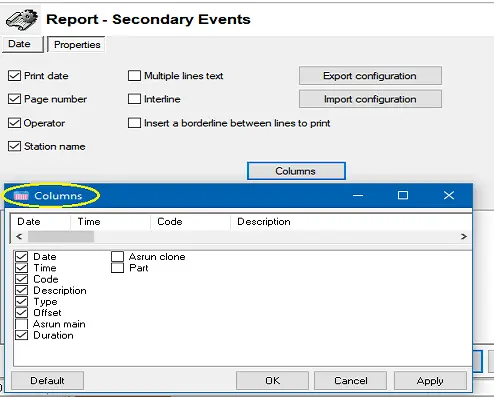
- Columns: It permits to specify the database fields that will be included in the report. In the top part of the columns window will be displayed the column headers as they will be shown in the report, it is possible to arrange them just by using drag and drop. A list of columns available to be inserted in the report are listed in the screenshot below:
Report Secondary Events
NB: The “AsRun main” column would display the start-time of the transmitted secondary events. If the secondary event is not transmitted, this column would displayed as blank.
Report Preview
The [Settings] permits to configure the page layout of the outgoing document; once filters and settings have been set it will be possible to select between displaying a preview using the related [Preview] button or printing the document directly using the [Report] button. Please note that some reports permit to export the generated document in the most common formats (pdf, csv, doc, xls, xml, etc) just by using the [Export] button.
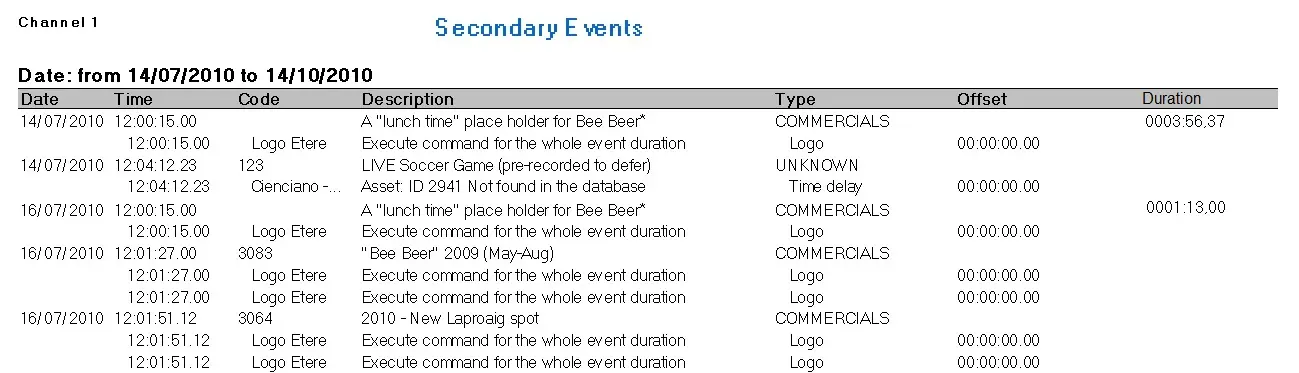
Secondary Events
Please note:
In the “Duration” column, the event duration is recorded when the “Take” command and “Clear Program” command is activated for the event, rather than the on-air duration set for the primary and secondary events.
 Report_Secondary_Events_
 Secondary_events