18.2.2 Login Report
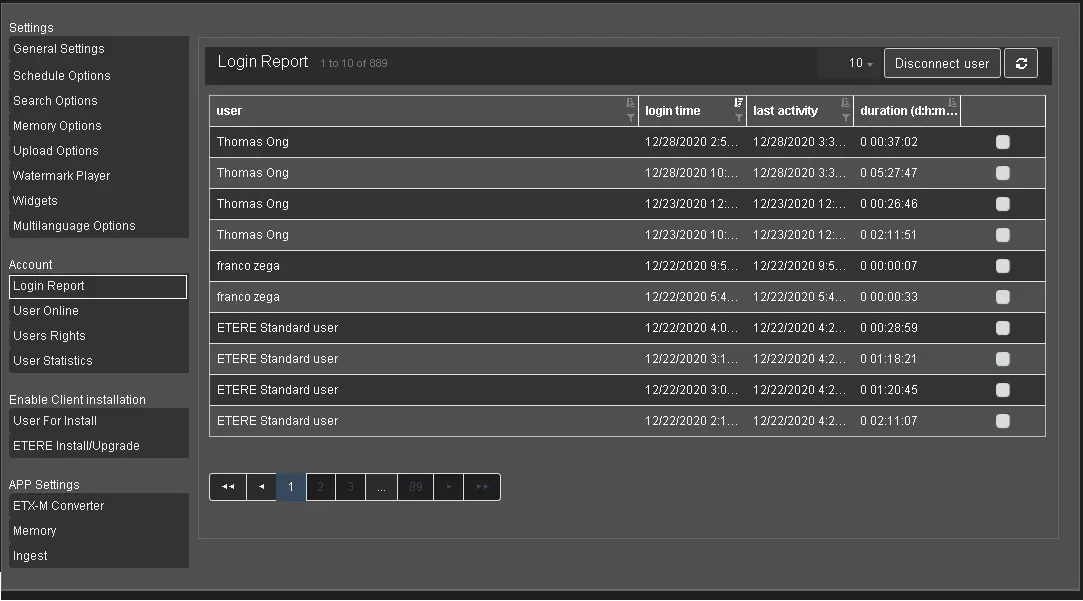
The Login Report presents information on the user accessing the Web services, where the most recent user login is captured on the report's first page.
The Login Report feature is only visible when you log in as a user account with administrator rights assigned.
Login Report
The information displayed includes:
• User: Login user name or company name;
• Login time: The date and time when the user login to Etere Web;
• Last activity: The date and time when the login user performed the last activity;
• Duration (d:h:m:s): The login duration time captured in Etere Web (in day:hour:minutes: seconds format). If the user does not logout from Etere Web, the time column will display the total login duration starting from the Login time;
• Logout time: The Logout time would be identical to the login time when the user login. When the user clicks on any menu on the left panel, the Logout time will be updated;
At the top-right corner, two functions are available:
• Disconnect user: If a login session remains inactive for an extended period, or the user has logged in to Etere Web from a different station, you can use the Disconnect user function to terminate the session 15 minutes after the command is issued. This function is only available for users with Administrator privilege;
• Refresh: Update Login Report with the latest status;
You can log in as a Domain user in the Active Directory or a user name registered in the Personal Data form. The application would first check the login name in Active Directory for authentication. When login is via Active Directory, the login user name would not be registered in the Personal Data form.
You can use the "sort" icon in the top right corner on each column to sort the column in ascending or descending order.
At the top right corner, you can display the line number of user login details to 10, 30, 60, or 150 lines or show all line details.
Note: If a user had selected the Nunzio Menu after logging in to Etere Web, a maximum of 5 users are allowed, including those not logging out from the previous login.
Note: This function is only active if the single access mode ("Web.ini / GENERAL / NoMultiAccess") is set (as "0") in the configuration file.
An error message would be prompted to alert the user if the single access mode is not defined.
 Login_Report