6.2.3.5 Scheduling Status
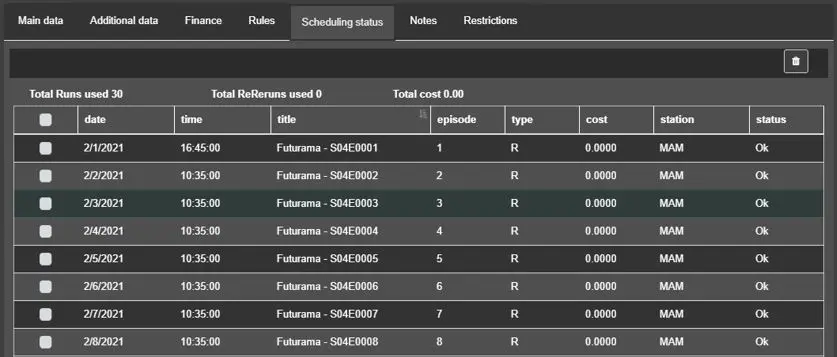
The Scheduling Status tab display details information on program scheduling.
Scheduling_Status
Column name - Date / Time
Description : The date and time when the program is scheduled in playlist.
Column name - Title
Description : The title of the scheduled episode.
Column name - Episode
Description : The episode number of the scheduled episode in the seasons.
Column name - Type
Description : Indicates if the program has been scheduled as a Run (R), ReRun (RR) or Not-scheduled-from-order (N).
Column name - Cost
Description : It displays the cost of the scheduled program.
Column name - Station
Description : The name of the station which schedule the program.
Column name - Status
Description : It displays the status of the scheduling process for each scheduled event.
On top of the columns, a summary of the Total Runs used, Total ReRun used, and Total Cost of the scheduled program are displayed.
By selecting an event(s) from the list and click on the Delete Scheduling icon, you can simply remove the selected event(s) from the schedule. Upon deletion, the total summaries information would be calculated and updated automatically.
 Scheduling_Status