54.3.2.1 Fixed Times
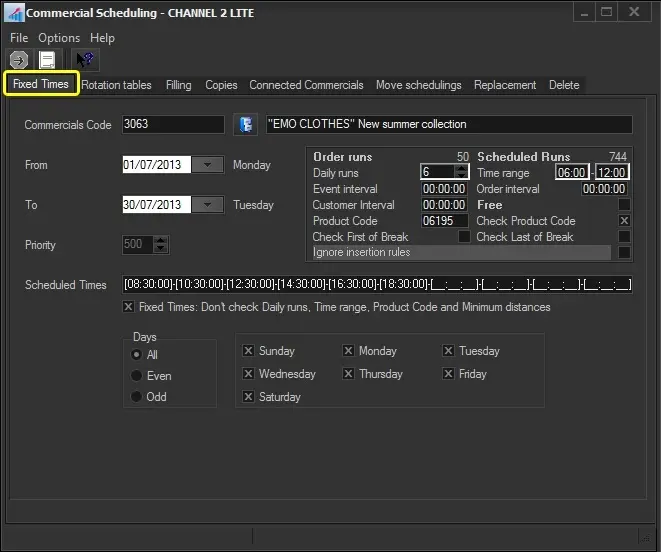
The Fixed Time section allows you to schedule an event in all time ranges the user indicates within a specified period. There is no control for a fixed time, which is also true of commercial crowding. To start scheduling a commercial across fixed times, search for it using the [Commercial Code] button and compile the following parameters:
Fixed_Time
Commercial Code: Search for the commercial asset to be scheduled.
From - To: Insert the programming period, by default you will see the start and end date of the order in the order form of the event
Order parameters: Retrieves the scheduling parameters from the commercial order related to the asset. It is also possible to modify these parameters to perform more customizable scheduling. Available parameters include:
Order runs - Number of performances expected for the event according to its order.
Scheduled runs - Actual performances of the event across all schedules.
Daily runs - Maximum event performances to be scheduled in a single day.
Time Range - Time interval in which event performances must be scheduled.
Event interval - Minimum gap between two runs of the same event.
Order interval - Minimum gap between two events of the same order.
Customer interval - Minimum gap between two events of the same customer.
Free - Indicates that the performances to be scheduled are free of charge and will not be invoiced.
Product code - Select the product code for the scheduled event.
Check product code - Avoid scheduling events with the same product category in the same time slot (e.g. 20:30:00).
Check first of break - The event will be scheduled as the first one of its time slot (e.g. 20:30:00).
Check last of break - The event will be scheduled as the last one of its time slot (e.g. 20:30:00).
Ignore insertion rules - If enabled, the scheduling process will ignore rules but log any issues encountered into the scheduling report.
Priority: Specify the priority with which the commercial asset will be scheduled. An event's priority is the criteria Etere uses to determine its position within a commercial cluster during the scheduling phase. This priority goes from 1 (highest priority) to 1000 (lowest).
Scheduled times: Enter the specific times at which the events will be scheduled.
Fixed times: Set this parameter to ignore some parameters of the Order of runs and Scheduled Runs sections, thus forcing the scheduling on the selected scheduled times.
Days: Select the days for which the event to be scheduled is valid, in which it will be scheduled:
All - On every day of the week, in the period of the dates indicated.
Even - Only on even days (e.g. 2-4-6-8...30) in the chosen period, independently of the day of the week.
Odd - Only on odd days (e.g., 3-5-7-9...31) in the chosen period.
Specific days - Select the weekdays (e.g. Monday and Friday) on which you want the commercial asset to be scheduled.
Once all parameters have been correctly set, press the RUN button to proceed with the fixed-scheduling process.
 Fixed_Time