Rundown
79.4.6.7 Logs of Rundown Access
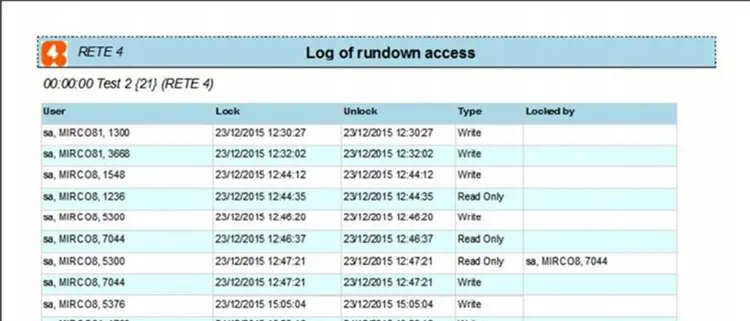
The Logs of Rundown Access contains the logs of the rundown operations with login name, time of access and operations detail.
4771_Logs_of_Rundown_Access_1
Use the following filter to generate the report:
- Rundown: Select a calendar date to retrieve the log report.
- User: Select a user from the list or specify “All” to filter all users.
- Only the current lock: Enable this option to filter only current locks status. If unchecked, all locks would be retrieved.
A sample of Log of Rundown access report is displayed below. You can use the <Print> icon to print the report, or use the <Page setup> icon to modify the page layout, or export the report using the <Export> icon to export report to Word format, or other supported formats, e.g. PDF, Excel, PowerPoint, Data Feed, XML, etc.
4770_Logs_of_Rundown_Access_2
 Logs_of_Rundown_Access_1
 Logs_of_Rundown_Access_2