71.4.8 Etere Multingest broker Service
Etere Multingest broker Service this is the most up-to-date version of the module Etere Scheduled Ingest Service Broker module which makes it have all the features of its predecessor and run in windows services.
NOTE: the service does not have a graphical interface like its predecessor
"Etere Scheduled Ingest Service Broker"
WARNING: to use it, you need to have the module licensed "EA1378" and it must be one to one
(1 service = 1 license)
->Each license must be inserted inside the resource properties of the workstation that will be used as client "Configuration > ResourceEditor > Workstation > Properties > Licence"
->This is because it will read the Ingest service configurations taken from the Etere.Ingest.ServiceX file to then create its own file Etere.Ingest.Service.Schedule_X
(Everyone will be in the folder: C > ProgramData > Etere > Ingest.service)
->This file can be generated and configured on ETEREWEB, as explained in the chapter 18.4.3.0
To install it, you must enable the checkbox > Etere_Multingest_broker_Service_Install
After installing it, the credentials (in the service) must be set with which it will be
started > Etere_Multingest_broker_Service_Setup
NOTE: In the latest versions of ETERE 36.1, the Multingest broker service will be able to manage all scheduled recordings for all channels/users (licensed), searching for all the various services installed in the various workstations.
->It will be enough to set the Schedule ingest channel in the parameters and select the "Station" field where the broker service should searchs for example:
For Example:
- Channel001/License -> for the ingest service installed on workstation_A (assigning schedule ingest channel 1 and selecting channel 001)
- Channel002/License -> for the ingest service installed on workstation_A (assigning schedule ingest channel 1 and selecting channel 002)
If required, other services installed on other workstations can also be assigned so the service broker can be in a different workstation than the other ingest services and not in the same workstation.
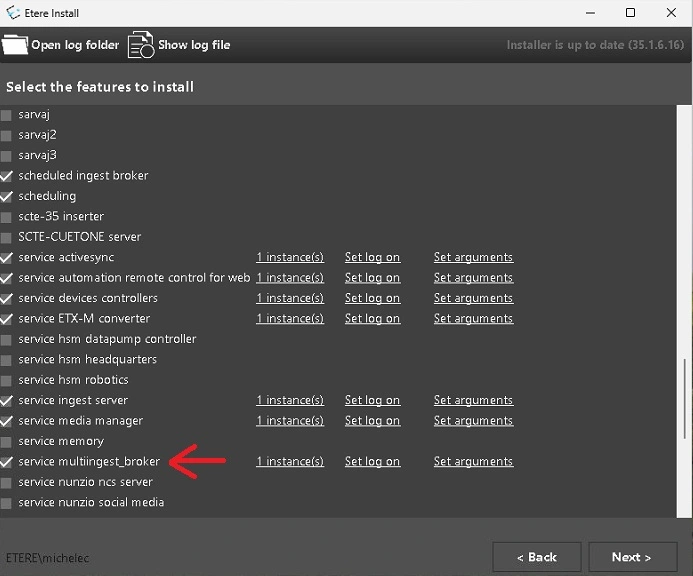 Etere_Multingest_broker_Service_Install
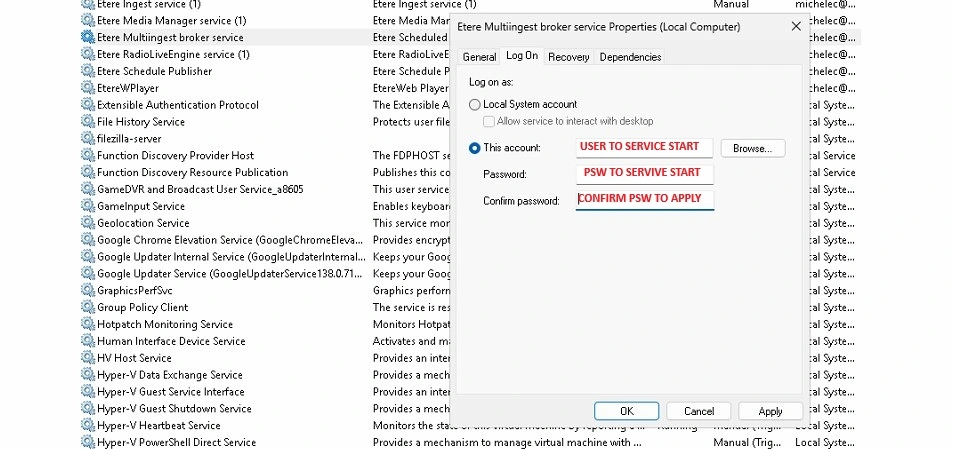 Etere_Multingest_broker_Service_Setup