14.3.2 Incoming Messages
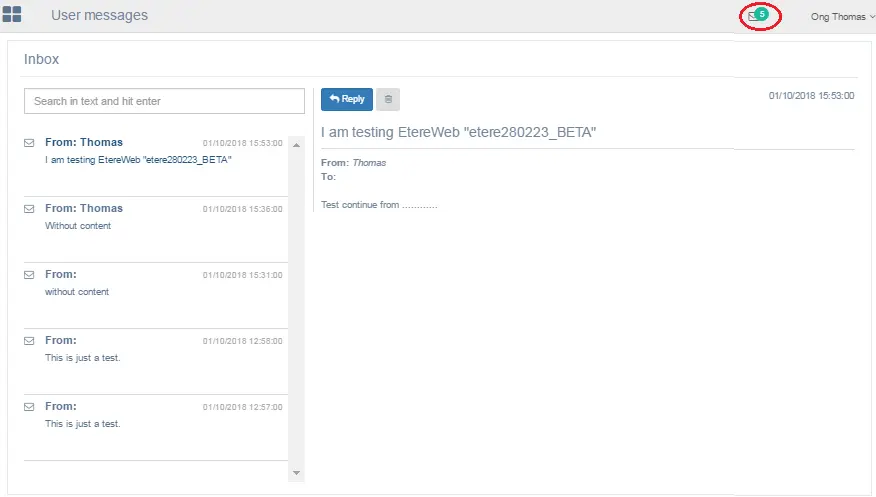
This is the messages “Inbox” for EtereWeb station where all the received messages are stored for the current login user.
User message
At the top right corner, the number in green simply indicate the total number of message count in the Inbox, one message per count.
After reading the message, you can reply to the sender by simply select the message based date and time and click the "Reply" button to lunch the new message creation dialog.
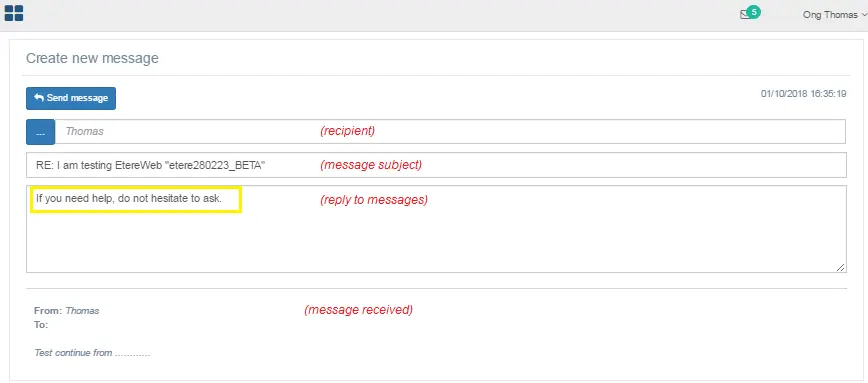
Create New Message
•By default, the sender name would be automatically reflected as recipient. You can click the “Search group and user” icon and select additional recipient to receive the reply message.
•The “RE” in message subject indicate this is a reply message, you can add your initials in the subject (e.g. FB, EB, etc) for easy reference if the sender is expecting reply from other recipients.
•Enter your reply message in the blank field.
•The content of the source messages are displayed at the bottom for reference.
When you had compiled the reply, click the button to send the reply messages to the sender and all recipients.
 User_message
 Create_New_Message