72.18.2.17 Adobe Web installation
In order to install the web application intended to be the bridge between Adobe Premiere and Etere MAM simply follow the procedure below:
From The Web Server
1.Copy the Adobewebapp folder from the Etere system package zip to C:\inetpub\wwwroot directory in the web Server
2.Open the Internet Information Services (IIS) Manager
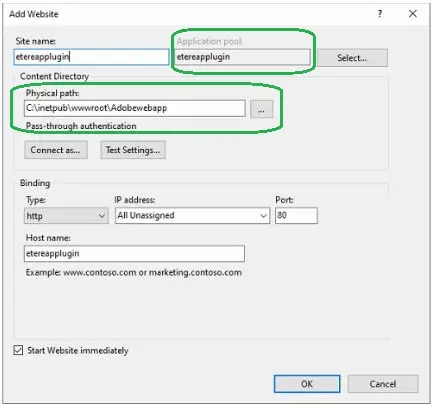
3.Add Website
(IIS) Manager
4.On Application Pool, choose a 4.0 integrated application pool. On Physical path, point to the directory path where you have previously copied the Adobewebapp folder to.
Add_website
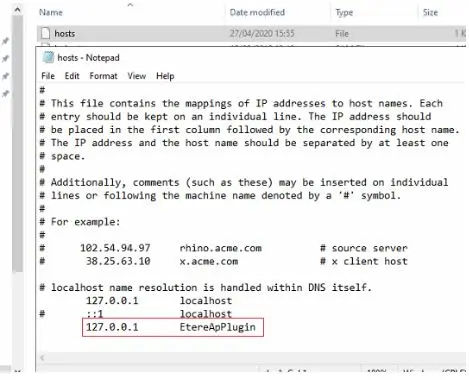
5.Add hostname.
In case the Web Server is not a server but a workstation, you need to add the local host name (127.0.0.1) to hosts on windows\system32\drivers\etc file.
Add_hostname
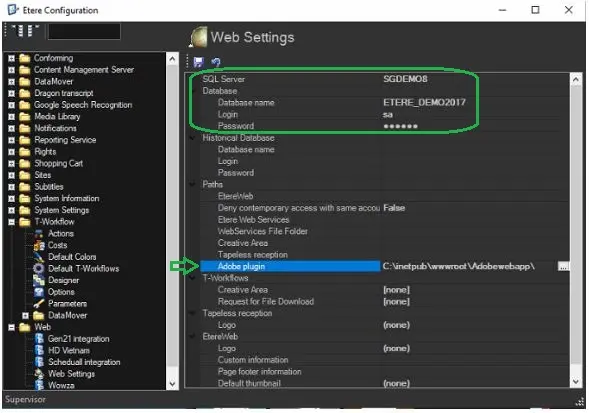
6.Now you can add the connection data on Etere Configuration > Configuration Editor.
In Web Settings, type the SQL Server name, Database name, and authentication credentials as shown below, and save the settings.
Web Settings
_Manager.webp "(IIS)_Manager") (IIS)_Manager
(IIS)_Manager
 Web_Settings
 Add_hostname
 Add_website