65.1.2.2 Properties
You can view or edit the resource properties by simply double-click on the resource.
ETX resource properties
ETX
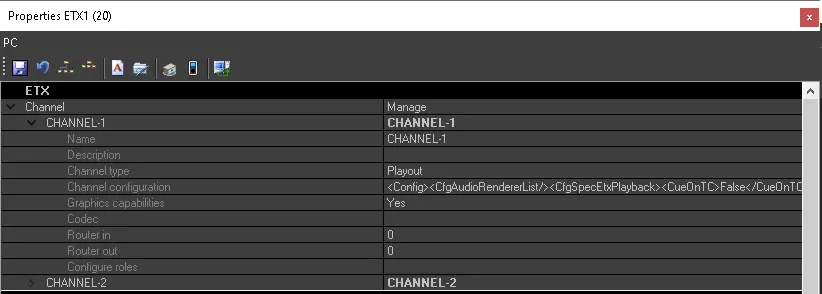
• Channel: See chapter 65.1.2.4 Channels and next ones for more information.GENERAL
• Number: This field display the number of the particular resource type already configured in the network. For instance, if there are 3 Video servers already configured, the new one will automatically show '”4” in the number field.
• Name: This field is automatically filled with the device’s name (displayed also in the resources list).
• System/Work ID: A unique Work ID automatically generated by Etere based on the source MAC address.
WARNING: In the event when hardware changes are performed on the Workstation or Etere applications has been reinstalled on the PC, a new Work ID would be assigned to the Workstation.
WARNING: From Etere released version 28.2 onwards no warning message would be prompt pertaining to the changes in Work ID.
• IP address: The IP address assigned to the Workstation.
• Static IP 1: (Leave it as blank)
• LAN ports total number: Indicate the LAN ports number present in the device.
• Pingable: Indicate if the device can be pingable or not (default value is true).
• Location: Specify the physical location of the device in order to facilitate overall resource management and allowing the operator to quickly find the given device, simply by looking at its configuration.
• Rack: All racks must previously be configured through Tools > Configure > Rack with a user-defined name and number of units contained in the rack.
• Room: Specify the room in which the device is situated.
• Rack start row: Specify which is the first row in the rack in which the device is situated (some devices can take up more than one row)
• Rack unit: Specify the number of rows occupied in the rack. The system automatically inserts the rack start row number, assuming that the device covers only one row.
• Cleanup: Set the criteria to be used to automatically clean up storage space when a given threshold is reached.
See chapter 59.8.2.5 Configure the cleanup parameters for further information.
• License for current station: Assign to the resource one or more specific licenses, in order to use some particular modules. See chapter 65.1.2.12 Licenses management for more detailed information.
GPI CARDS
• GPI cards: Specify here the details about the GPI cards connected to the device (model, driver, input IP address and port, output IP address and port number, etc).HSM CACHE
• Cache: Specify here if a path in the device has been designated as HSM cache.SERIAL PORTS
• COM ports: Specify the COM ports connected to the device.SQL
• SQL version: If the device hosts Microsoft SQL Server services and applications, the user can specify here its version, choosing between SQL Server and SQL Express.
• SQL server name: Specify here the SQL server name.
• SQL database name: Specify here the name of the database used by Etere.
• SQL login name\ password: Specify the credentials to use to login in the SQL Server instance.
VOLUME
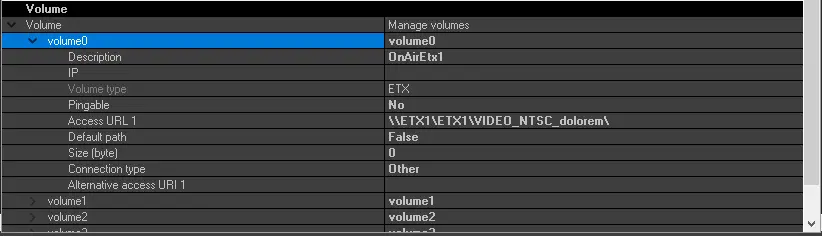
• Volumes: Define the storage volumes for the device. See chapter 65.1.2.3 Volumes for more detailed information.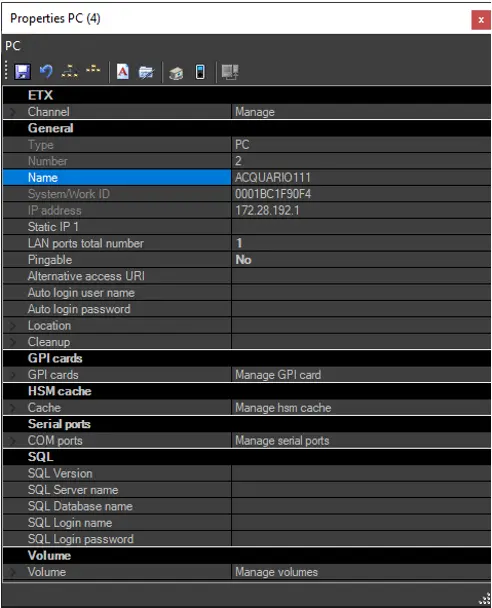 ETX_resource_properties
 4888_channel_section
 4889_volume_section