54.5.2.1 Fixed Times
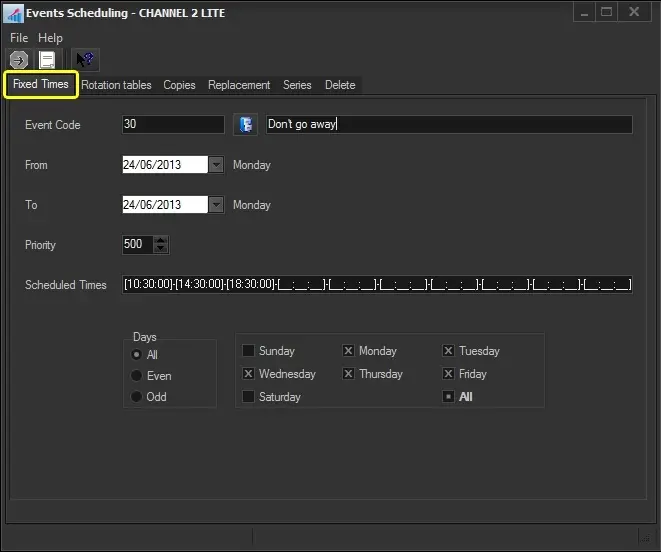
The Fixed Times section allows you to schedule an event in all time windows the user indicates within a specified period. To start planning an event across fixed times, search for it using the [Event Code] button and then compile the following parameters:
Fixed_Times
Event Code: Search for the asset to be scheduled.
From - To: Insert the dates range in which the event will be scheduled. By default, the validity period of the asset is proposed.
Priority: Specify the priority for which the event will be scheduled. An event's priority is the criteria Etere uses to determine its position within a commercial cluster during the scheduling phase. This priority starts from 1 (highest) to 1000 (lowest).
Scheduled times: Enter the specific times at which the events will be scheduled.
Days: Select the days for which the event to be scheduled is valid, in which it will be scheduled:
All - On every day of the week, in the period of the dates indicated
Even - Only on even days (e.g. 2-4-6-8...30) in the chosen period, independently of the day of the week
Odd - Only on odd days (e.g. -3-5-7-9...31) in the chosen period
Specific days - Select the weekdays (e.g. Monday and Friday) on which you want the commercial asset to be scheduled
Once all parameters have been correctly set, press the RUN button to proceed with the scheduling process.
 Fixed_Times