70.4.2 Data Pump common issues
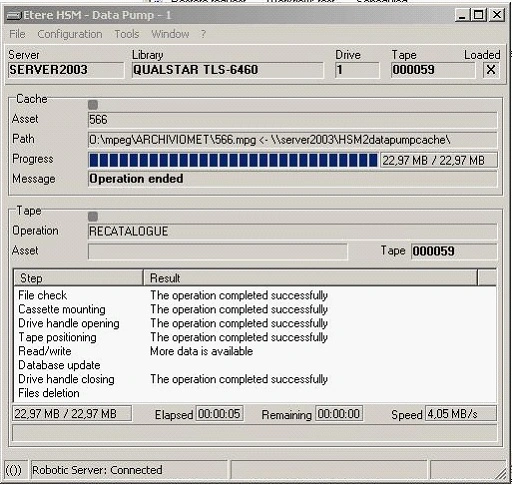
• 0x000000EA - "More data is available"
Symptom:
When reading a tape, the "More data is available" error message is displayed:
more_data_is_available
Cause:
Data on the tape has been written with a block size larger than the currently set one.
Solution:
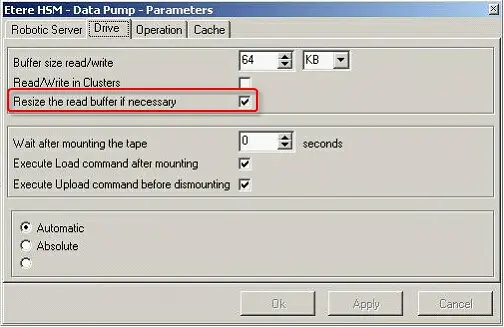
Enable the "Resize the read buffer if necessary" option located in the Drive tab of the Datapump parameters section and restart the workflow:
Etere HSM - Data Pump - Parameters
----------------------------------------------------------------------------------------------------------------------------------------------
• 0x20000111 - "Command time out" (during cassette dismounting)
Symptom:
Dismounting a cassette returns the 0x20000111 error code (Command time out):
>> EtHsmDataPump-x.log:
9.9.2009 18:13:57.459 547486.09 0000 dismounting drive in progress
9.9.2009 18:15:57.568 547606.12 0000 dismounting drive: 20000111 Command time out
9.9.2009 18:15:57.615 547606.13 0000 ProcMountCassette - ERROR 536871185 Command time out
That can be followed by the errors:
9.9.2009 18:16:34.677 547643.14 0000 mounting 001005: 00000057 The parameter is incorrect
9.9.2009 18:16:34.677 547643.14 0000 ProcMountCassette - ERROR 87 The parameter is incorrect
Cause:
Usually, the dismount command time-out is due to a need of the drive to unload the tape before dismounting the cassette.
Solution:
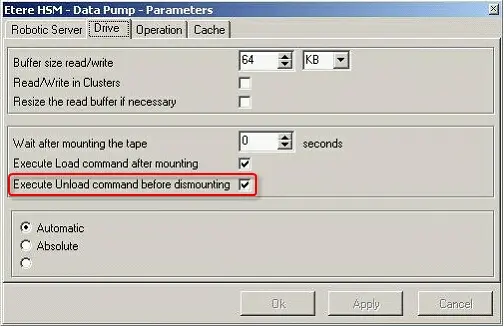
Enable the "Execute unload command before dismounting" option located in the Drive tab of the Datapump parameters section:
Execute unload command before dismounting
----------------------------------------------------------------------------------------------------------------------------------------------
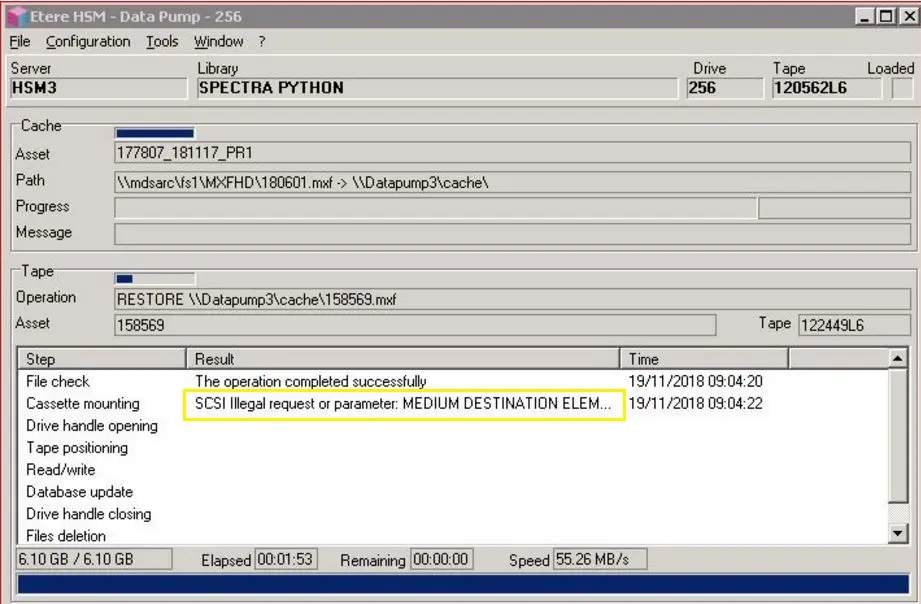
Symptom:
In Etere version 25, SCSI error “MEDIUM DESTINATION ELEMENT FULL” is encountered in Data Pump when mounting and dismounting tapes from Spectra Python tape library. The error persists even after restarting Spectra Python Tape Library, HSM Headquarters, and Data Pump.
Etere HSM - Data Pump 256
Cause:
There is misalignment of tape location in database and its actual position in Spectra Python tape library.
Solution:
From Etere released version 29.1 when SCSI error “MEDIUM DESTINATION ELEMENT FULL” or “MEDIUM SOURCE ELEMENT EMPTY” is triggered from the “Move” command, Etere Robotics would perform a scanning of Library content and update tape inventory to SQL database. The scan can be also launched manually from HSM Headquarters: in the node "Media", right click on any tape and select "Scanning" from the contextual menu.
----------------------------------------------------------------------------------------------------------------------------------------------
Scenario:
In HSM, Data Pump checks the correspondence between the drive name in Tape Library and Tape Drive by comparing its serial number. If Tape Library does not provide the drive’s serial number to Tape drive, the drive name could be changed after a reboot and, as a result, operations on tapes cannot proceed.
Possible solutions:
• HSM Tape Library retrieve drive’s serial number stored in library as well as from the drive buffer.
• When Tape Library does not provide drive’s serial number information, Data Pump warn customer to set the “Persistent Binding” key value to “dword:00000001” in following Windows Registry
[HKEY_LOCAL_MACHINE \ SYSTEM \ CurrentControlSet \ Control \ Tape]
Nevertheless, customer can disable the device name correspondence check by disabling the "Check drive mismatch before tape read/write operations" option in Data Pump, at one’s own risk.
----------------------------------------------------------------------------------------------------------------------------------------------
Cause:
LTO tape failed to dismount from tape drive. It reveals the tape drive needed to receive a SCSI’s MOVE command upon received dismount command from host application.
Possible solution:
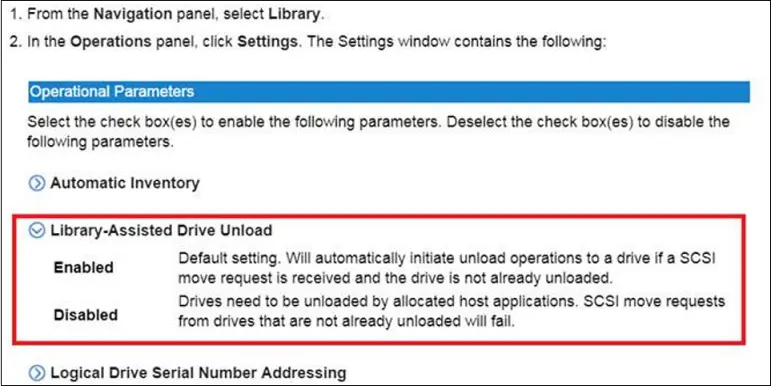
In LTO Tape Library manual, it revealed that the option “Library-Assisted Drive Unload” in Operations Parameters is likely the solution to the reported error.
Library-Assisted Drive Unload
In the event if Etere’s SCSI commands does not include the “unload” command, the tape exchange would fail. Enable the mentioned option to make the library perform automatically the "unload" operation before the move.
----------------------------------------------------------------------------------------------------------------------------------------------
Scenario:
In T-workflow, a Multistep Copy action was executed multiple time (> 100 times) in a day to copy files from HSM Archive to staging server, due to many codecs and devices involved customer is unable to define the source and destination codec in the copy action. Despite the fact that the same Copy action is executed many times in a day, customer encounter the “Error 50000” occasionally without noticeable differences.
Cause:
The source file was copied from HSM Archive to HSM Cache, but the file in HSM Cache was deleted before the end of the Copy action. As a result, Data Mover is unable to retrieve the information to update the database to set the destination file, despite the fact that the physical file has been copied correctly.
Solution:
Customer is advised to increase the available HSM Cache space to retain the file information while Copy action is still in progress.
----------------------------------------------------------------------------------------------------------------------------------------------
This happens when the same cache path is set on different datapumps. They try to process 2 different actions, caching the same file at the same time.
Set a different path as cache for each Datapump and restart them.
----------------------------------------------------------------------------------------------------------------------------------------------
Files are cached but they don't get archived in the tape. The error appears in both Datapump and workflow logs.
>> EtHsmDataPump-4.log
12/03/2026 20:32:43.838 22200.11 0000 ARCHIVE FILE begin
12/03/2026 20:32:43.838 22200.11 0000 - file: \\Rc-hsm-2\hsm_cache\SL_250606C.mxf
12/03/2026 20:32:43.838 22200.11 0000 - to tape: 061300L8
12/03/2026 20:32:43.842 22200.11 0000 size = 2'239'662 KB
...
12/03/2026 20:32:47.438 22204.01 0000 SetTapePosition(SPACE_END_OF_DATA, 0): begin
12/03/2026 20:39:21.633 22598.05 0000 SetPosition: result 0x00000450 No more data is on the tape
Execute the recatalogue of the tape.
----------------------------------------------------------------------------------------------------------------------------------------------
HSM found a CRC error while reading the tape.
The CRC error can be fixed with a Check of the tape. Load the faulty tape in a Datapump and execute the Check from Datapump's Contents tab. See chapter 70.3.8.5 Contents tab for more information.
----------------------------------------------------------------------------------------------------------------------------------------------
The archive or restore of a file from an LTO7 tape fails. The drive where the tape is loaded is an LTO6 drive.
An LTO6 drive is not compatible with an LTO7 tape, so it can't be read/written.
Dismount the LTO7 tape from the drive and mount a different and compatible tape. Mount the LTO7 tape on a compatible LTO7 drive and restart any operation on that tape.
 more_data_is_available
 Library-Assisted_Drive_Unload
 Execute_unload_command_before_dismounting
 Etere_HSM_-_Data_Pump_-_Parameters
 Etere_HSM_-_Data_Pump_256