209 Etere Multichannel Ingest
Etere Multichannel Ingest is a multichannel and multi-format ingest software that combines all the features in a single platform, including multiple live, ingest, and simple previews for up to 8 channels. Etere Multichannel Recorder Player fully integrates with Etere Ecosystem and works seamlessly across workflows.
Etere Multichannel Ingest also provides perfect integration with any third-party modules. The solution is designed with a user-friendly interface and simple operations menu. It allows managing the ingestion of many files effectively for mission-critical broadcast and archive operations.
In the next chapters both Etere Multichannel Ingest versions are described:
Etere Multichannel Ingest - The standalone module and the simplest one of the two versions.
Etere Multichannel Ingest Client - The most complete and powerful one, which connects and controls Etere Ingest Service, taking advantage of all the benefits of a client-server architecture (see Etere Multi-Channel Ingest - Server and Client - ETX based chapter).
INSTALLATION & CONFIGURATION
As mentioned in the previous chapter, Etere Multichannel Ingest doesn't need to connect to any service, so its installation is really simple.
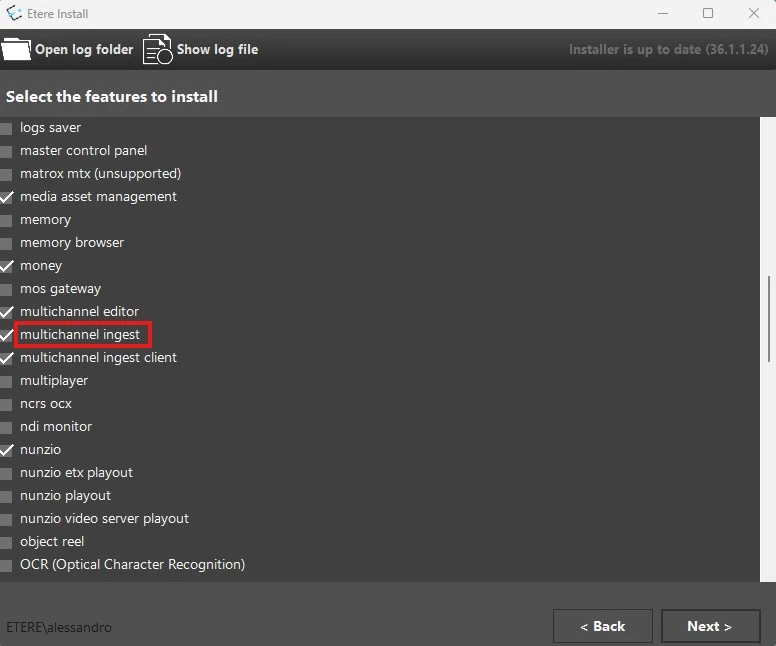
Open Etere Update module (EtereInstall.exe) and select the feature shown in the image to install the module in the desired workstation.
multiingest_installation
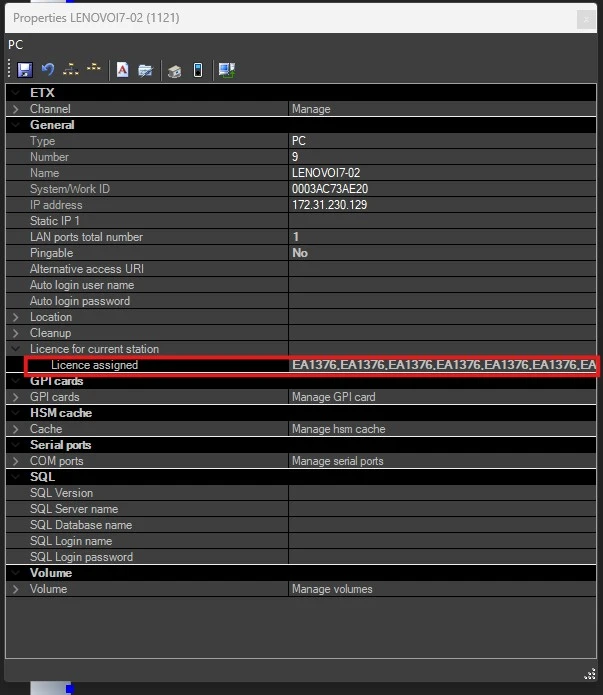
For this module, the only configuration needed in the resource is to set the license inside it's properties.
You will need a module EA1376 for each form you need in Etere Multichannel Ingest. For example, to run 6 simultaneous recordings, you need 6 EA1376 modules included in the Etere license, and those codes must be set in the resource properties, as shown in the image:
ea1376_resource
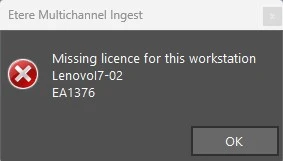
If the module licenses are not set, the application returns this error at the startup:
missing_license_EA1376
 multiingest_installation
 ea1376_resource
 missing_license_EA1376