201.13.4 General tab
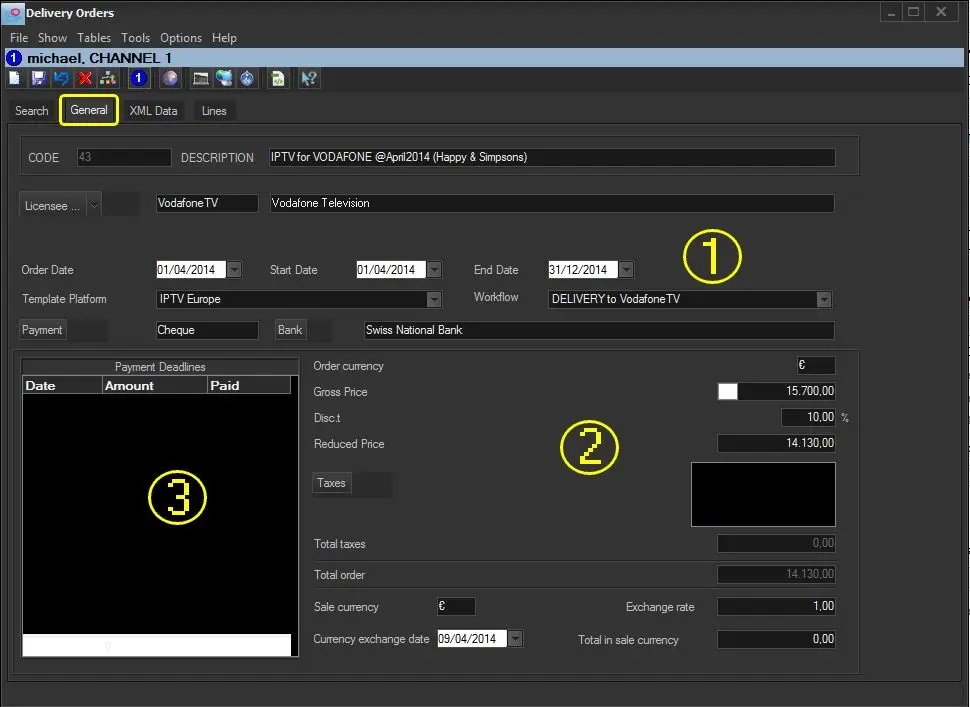
The "General" tab is used to compile information related to the delivery of contents, information are mainly divided into 3 areas:
Bms_ott_general
GENERAL DATA
(Located in the top part, enter here relevant information regarding the parties involved in the Delivery Order)
Code - It is a non-editable field (it's automatically generate by the system) represents the main identification key of the Delivery Order within the database.
Description - Enter the short descriptive information for the order.
Description entered can be used as search field to locate the order.
Licensee - Input the licensee (e.g. delivery service provider) related to the current Delivery Order. The search is performed across the Personal Data database by click on the [Licensee ...] button.
NB: In case the selected distributor has some preset information configured on its personal data, it will be automatically retrieved on the related fields (i.e. Payment, Bank, Discount, VAT).
Order date - Specify the date the Delivery Order was created/issued/stipulated.
Start date - End date - Set the valid timeframe of the Delivery Order.
Platform template - Specify the media platform which order content will be delivered. This parameter determines the specific platform (e.g. Netflix, Hulu Plus, Amazon Prime, Redbox Instant, Vudu, Vodafone TV, CanalSat, Orange Nouvelle TV, etc) to which content included in the order is licensed.
NB: Platforms are preset under the Delivery Orders > Platforms section.
Workflow - The deliver workflow would automatically prepare media files to be delivered (e.g. adjust their aspect ratio, audio language,etc), generate the XML file containing all required contractual and technical data and deliver all files (e.g. via FTP).
NB: Refer to Delivery Workflow for more detailed information.
Payment - Indicate the payment method to be applied to the order, to pay orders as used (i.e. as their order lines are scheduled) and invoicing it (e.g. in instalments).
NB: Payments are preset under Configuration > Settings > Invoice archives > Payments.
Bank - Select the bank data (swift code and other bank details) through which the Delivery Order will be paid to, for example, enable the Accounting department to activate payments.
NB: Banks are preset under Configuration > Settings > Invoice archives > Banks.
PAYMENT DATA
(Located in the bottom right part, enter here information on the overall value of the order)
Order currency - Indicates the currency the order will be paid.
NB: Currency is automatically retrieved from the regional settings of the windows system.
Gross price - Insert the expected gross price of the Delivery Order.
Discount - Insert any discount you wish to assign to the Delivery Order in question.
Reduced price - This will automatically calculate as the Gross Price minus the discount percentage assigned.
Taxes - Specify the tax code percentage to be applied to the Delivery Order.
NB: Tax codes are preset under Configuration > Settings > Invoice archives > VAT codes.
Total taxes - The total sum of all taxes.
Total order - The total Delivery Order amount are automatically calculated as the Reduced Price plus any taxes assigned to the Delivery Order.
Sale currency - Specify If the Delivery Order has been established under a different currency.
Exchange rate - If the order is paid in foreign currency (common issue on international orders), specify the agreed exchange rate for orders paid in foreign currency.
Currency exchange date - Indicate the date of the exchange rate used for foreign currency conversion.
Total in sale currency - Manually enter the agreed Delivery Order price in the foreign currency.
NB: Etere does not calculate this automatically as there are often commissions to be included.
PAYMENTS DEADLINES
(Located in the bottom left part, manage here the settlement of payments)
Payment deadlines - Specify all prepaid and postpaid payments.
NB: For detailed information see the Payment of Rights chapter.
 Bms_ott_general