77.1.2 Insert Asset Data
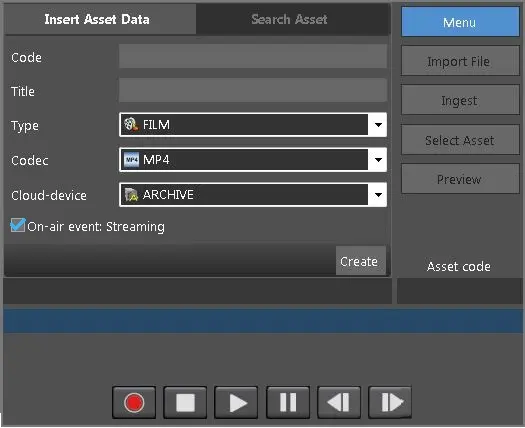
The Insert Asset Data tab allows you to create a new asset to record.
Insert_Asset_Data
• Code: Specify the code of the asset to record. According to what is inserted here, different scenarios will happen when the <Create> button is pressed. See below for details.
Note: if the rules for the management of CODE generation are enabled, they will be respected. Refer to Configuration > Settings > Basic Configuration > Codes.
• Title: Specify the title of the asset data.
• Type: Select the destination asset type from the list.
• Codec: Select a suitable codec from the list.
• Cloud-device: Select the cloud-device where the new asset should be linked from.
❑ On-air event: Stream: By enabling this option, you can edit the asset while it's being recorded. This option is enabled by default.
Click the <Create> button to insert the asset data.
According to what has been inserted in the Code field, one of the following scenario would take place:
• If this button is pressed when the code field is empty, the code will be automatically assigned and the user is asked to confirm or change the asset data in a new dialogue box.
• If the code inserted does not exist, the dialogue box will appear anyway, requiring a confirmation to the user.
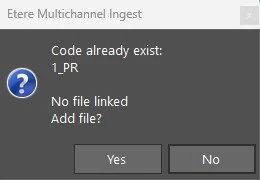
• If the code inserted already exists and it has no metafile, the user is warned with the following message and the asset will be able to be recorded.
code_exists_no_file_linked
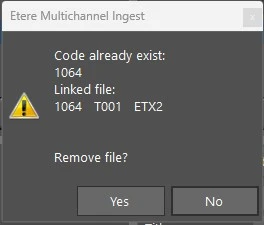
• If the asset has one metafile, the application asks whether to replace the metafile.
code_exists_one_file_linked
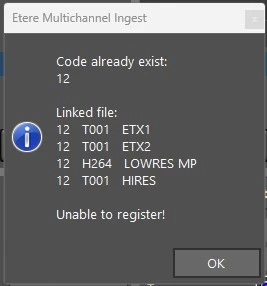
• If the asset has more than one metafile, the asset would not be created. A warning message will be prompted and the user will have to insert a different code, let the module create a new code or select another asset (see 77.1.3.0 Search asset).
code_already_exist
Additional notes:
- The new asset is created when recording starts, with asset duration set to 0.
- The asset duration and metafile size are updated when the recording is completed.
- If recording is confirmed by user, the default workflow would be attached.
- If user confirmation is omitted, the metafile would be deleted.
 Inesrt_Asset_Data
 code_exists_no_file_linked
 code_exists_one_file_linked
 code_already_exist