72.2.1.20 Import Asset List on Search Tab
From the search tab on media library, it's possible to import a list of assets to search.
This feature it's available for the fields ID, CODE and TITLE.
search_results
Click on the button beside these fields and select the text file to import, then launch the search. The search results are displayed in the same order as they are written in the file.
In case one or more assets can't be found, the user is warned by a popup message, which shows also the missing results.
Notes:
• The elements in the file can be separated by a comma or by line breaks.
• To separate elements, do not use: spaces, different characters from the allowed ones, more than one character.
• Media library looks for a match with the whole element in the database; it's not a full-text search.
• Media Library search is not case-sensitive.
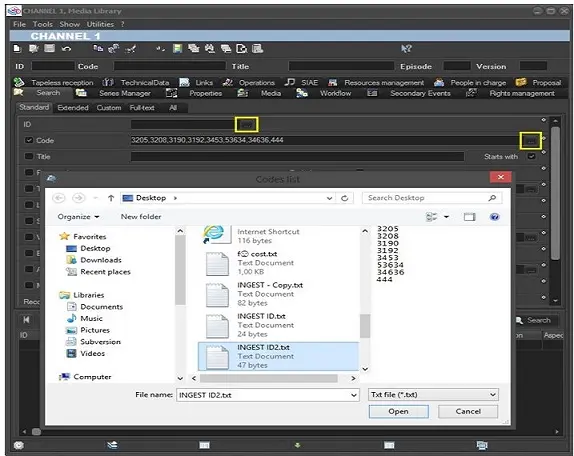 Search_Parameters