59.9.3.9 Update default values and Update screen language in Etere 36
With version 36, Etere introduced a brand new method to launch and execute system maintenance.
The new installer EtereUpdate.exe is able to run system maintenance (see chapter 1.3.6.0 Etereweb setup) faster than the old method and allows to install also Etereweb site with a single operation.
The operation Update default values was integrated with "Check main database structure", but since the new system maintenance doesn't execute this step, in the last 35.2 versions it has been separated and placed as a different system maintenance operation, allowing to launch it anyway from Etere Configuration when necessary.
Also the Update screen language function has still to be performed from Etere Configuration.
After running the NEW maintenance, a white label will appear showing the application name along with the date and time of the last execution. Both functions will be checked by default when opening the System Maintenance form.
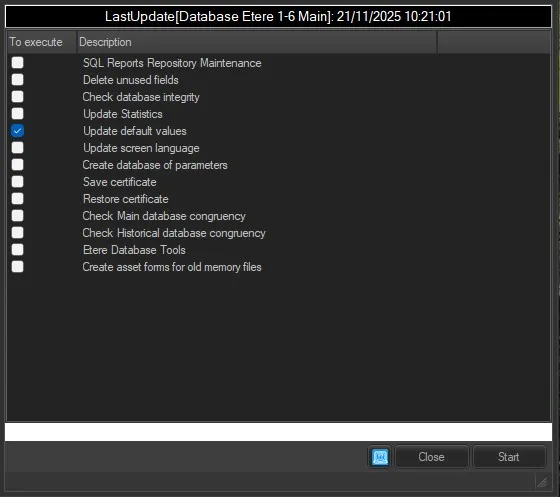 Default_values