73.3.8 Video Check
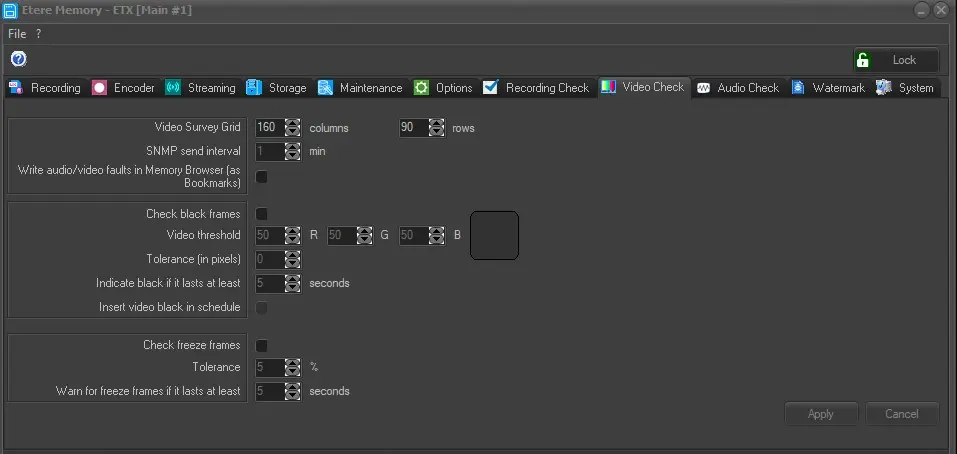
Under the "Video Check" tab, you can configure parameters regarding to video content control.
Memory_VideoCheck
General video checking parameters:
Video Survey Grid: This parameters permits to determine the space (grid) to be analyzed while checking either a scene change or a freeze control.
SNMP send interval: Indicate the time interval (in minutes) where video issues would be monitored and notified via SNMP messages.
Write audio/video faults in Memory Browser: When this option is enabled, all identified audio faults and video black faults and freeze faults would be inserted in Memory Browser.
Black video checking parameters:
Check black frames: If enabled, the black video check would be required during ingest. The application checks the presence of black pixels in the reference video threshold RGB.
Video threshold: In case black frames are not traceable using the default values, it is possible to modify both the grid's dimensions and the black tonality's percentages by changing the RGB parameters.
Tolerance (in pixels): Allows setting the maximum number of blacks pixels allowed in a scene, scenes with a greater value will be considered 'blacks'.
Indicate black if it lasts at least: Black frames are notified when having a length more than the value specified in this parameter.
Insert video black in schedule: If this option is enabled, when a black frame is detected longer than the configurable duration, Memory would insert a black segment in MAM database.
Freeze video checking parameters:
Check freeze frames: If enabled, the freeze video would be treated as black frame and would be notified when its value is more than the value specified in parameter "Warn for freeze frames if it lasts at least".
Tolerance (percentage): Specify the maximum tolerance between two consecutive frames in order to be considered identical in the video freezing control.
Warn for freeze frames if it lasts at least: Set here the minimum length that a frozen video must have in order to be considered as freeze.
Apply: To confirm the changes made.
Cancel: To discard the changes made.
 Memory_VideoCheck