72.13.2.2 Assigning Worksheets
During their creation, worksheets are set to being assigned either manually or automatically. Depending on this fact, worksheets will be assigned as follows:
Automatic assignment
In case the worksheet has been set for "to assign" to an automatic assignee/group/role, every time a T-workflow will get into the worksheet, it will be automatically inserted in the Agenda of the person(s) assigned through any of the following methods:
Assignee - The worksheet will be automatically assigned to the selected user, it will be displayed as "available" only for that user (thus allowing him to undertake the worksheet). For all the rest of users it will be shown as "not available".
NB: Users available here are those "enabled to take jobs" under their Personal Data > Other data section.
Group - The worksheet will be automatically assigned to the selected group, it will be displayed as "available" only to group members (thus allowing one of them to undertake the worksheet). For all the rest of users it will be shown as "not available".
NB: Groups available here are those configured in the Etere Configuration > Settings > Rights section.
Role - The worksheet will be automatically assigned to the role's user set as a people in charge of the asset, it will be displayed as "available" only for that user (thus allowing him to undertake the worksheet). For all the rest of users it will be shown as "not available".
NB: Roles available here are those defined in the Personal Data > Roles section.
Manual assignment
In case the worksheet has been set only "to assign" (i.e. without any automatic assignee/group/role), every time a T-workflow will get into the worksheet, it will wait for a person to be assigned from the Resources Manager module:
Resources Manager
No assignment
In case the worksheet has not been set "to assign", every time a T-workflow will get into the worksheet, it will be displayed as "available" to all users (thus allowing one of them to undertake and execute the worksheet).
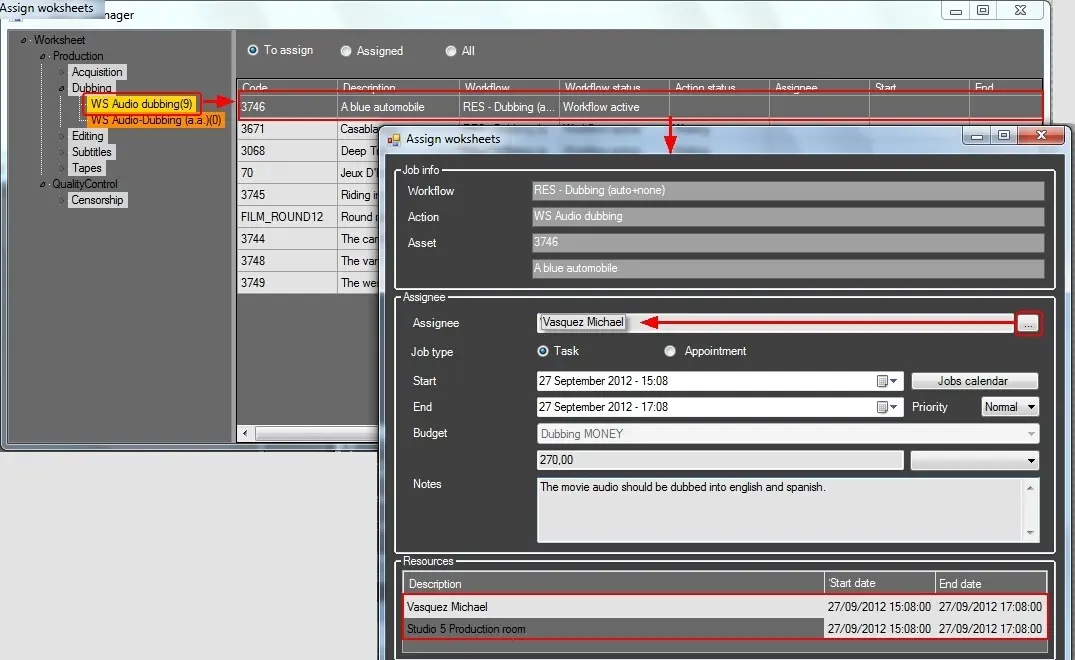 Resources_Manager