54.8.2.3 Personal Data Form
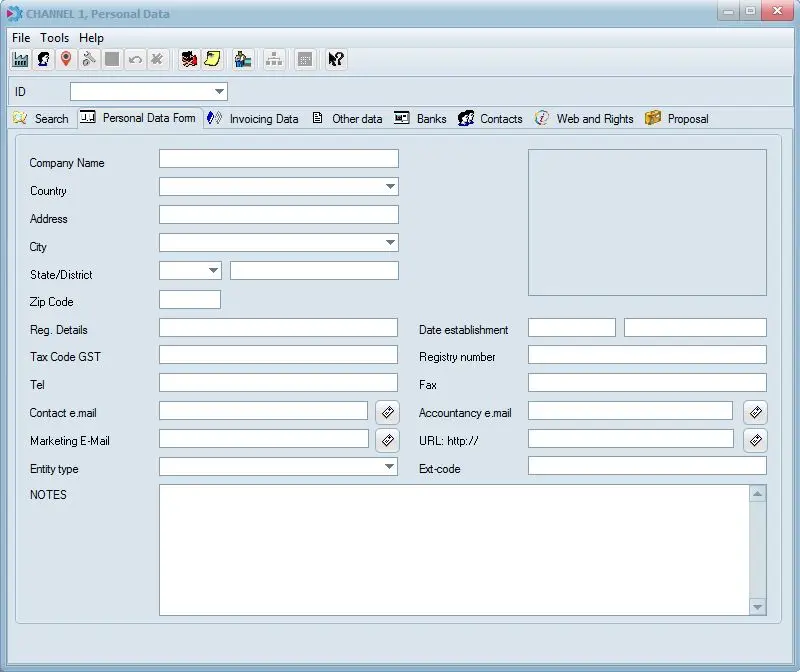
The Personal Data tab allows to enter the main data regarding the currently opened contact, among the more relevant fields presented in this tab are:
Config_personal_data_form
Personal Data Form
Code - Indicate a univocal code (it can not be duplicated), its maximum length is 250 characters.
Company name / Name - Enter either the name of the company or person to which the form is related.
Location - Set the country, address, city, state and zip code to detail the location of the person/company. You can enter up to 100 characters in the “Address” field to clearly identify the locations.
NB: Available cities, states/districts and zip codes depends on the country set in Configuration > Settings > Basic > System; note that these fields can be manually entered for a more custom definition.
Date establishment - Date of the person/contact been contacted the last time.
Registry number - Insert the VAT registration number referred to either customers or suppliers, it will help to speed-up future invoicing operations.
Marketing e-mail / Office e-mail - Enter the e-mail address to which automatic notifications will be sent.
NB: This field is named "marketing e-mail" for companies and "office e-mail" for persons.
NB: If this field is not filled, mailbox services will be unavailable for this code.
Entity type - Specify the relationship between the current person/company and the station, indicate if it's a 'account executive' (which commissions can be set using the Configuration_PersonalData_Agent02 commissions button), 'agency', 'media center', 'purchasing groups' or 'none' of the previous.
NB: If this field is compiled, the contact layout used for the current person will be the same used for companies, it will be possible to specify its invoicing data, banks, etc.
Signature - Load a digitized signature to be included in generated documents, from either a file or a scanner
 Config_personal_data_form